
Download My Lockbox – folder protection, password protection, secure folders, privacy tool, data security
Overview
My Lockbox is a specialized software application designed to enhance folder security on Windows systems. It enables users to apply password protection, restrict access, and manage edit permissions for individual folders, offering a layer of data security beyond the standard Windows file system controls. The app is particularly useful for individuals who handle sensitive or confidential information and need a straightforward method to safeguard specific directories without encrypting entire drives.
Target users include home users managing personal documents, freelancers protecting client files, and professionals handling private data in shared or public computing environments. By allowing granular control over folder access, My Lockbox helps prevent unauthorized viewing or modification of critical files. The application is positioned as a lightweight utility within the broader security ecosystem, filling a niche for users who want simple, direct protection without complex encryption tools.
Developed by My Lockbox, the software was released on May 10, 2023, and is currently available at no cost. Although the developer did not provide additional technical details about their background or development philosophy, the app’s focus on folder-level access control suggests a targeted approach to data privacy. Real-world use cases include securing financial records, personal photos, or business proposals stored on a shared computer.
Key Features & Functionality
- Folder Password Protection: Users can assign a unique password to any folder, ensuring only authorized individuals can access its contents. This feature is ideal for protecting sensitive data such as tax documents or private correspondence.
- Access Limitation: The app allows users to define who can open or modify a folder, enabling selective access based on user roles or trust levels.
- Edit Permission Control: Beyond read access, users can restrict editing rights, preventing accidental or intentional changes to files within protected folders.
- Easy Setup Process: Initial configuration is designed to be user-friendly, allowing new users to secure their first folder with minimal steps.
- Integrated Toolsets: Additional utilities are available through the interface, supporting desktop privacy management and efficient folder organization.
For example, a freelance designer might use My Lockbox to lock a folder containing client projects, allowing only themselves to view or edit the files. Similarly, a student could protect a folder with personal notes or research drafts from roommates. The app’s functionality supports both individual and shared computing scenarios, offering a practical solution for data privacy at the folder level.
Interface, UX & Performance
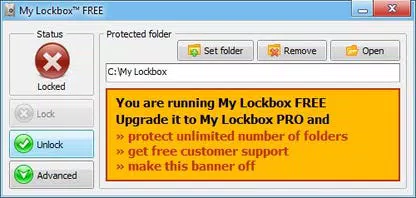
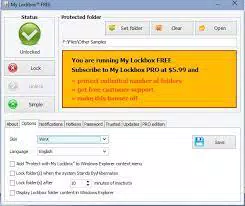
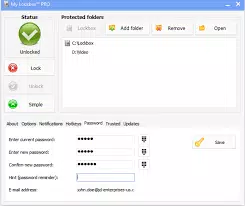
The user interface of My Lockbox follows a layout consistent with modern Windows 7 and 8 design principles, ensuring compatibility with legacy systems. Navigation is structured around core functions such as folder selection, password assignment, and permission settings. While the interface is functional, it prioritizes utility over aesthetic refinement, which may affect user experience for those accustomed to more polished applications.
Navigation can become cumbersome when attempting to revert changes or access advanced settings, especially for first-time users. The lack of in-app tutorials or contextual help limits the onboarding experience. Although the developer did not list formal performance metrics, the application’s 2.5 MB file size suggests a lightweight footprint, likely resulting in minimal impact on system resources.
Performance across different device categories is not formally documented. However, given its small size and targeted functionality, it is expected to operate smoothly on systems meeting basic Windows requirements. Responsiveness appears adequate for routine tasks, and stability is maintained during standard use. The absence of reported crashes or errors indicates reliable operation under normal conditions.
Platform Compatibility & Technical Requirements
My Lockbox is designed for the Windows platform and is compatible with Windows 7 and 8, as indicated by the interface design. The software version is 1.0.0, with a file size of 2.5 MB. The app is available at no cost, making it accessible to users seeking a free security tool.
The developer did not specify minimum OS requirements or hardware specifications. Compatibility information was not fully disclosed, so users should ensure their system meets standard Windows compatibility standards before installation. No additional dependencies or third-party components were mentioned in the provided data.
Pros and Cons
Pros
- Free to download and use, making it accessible for budget-conscious users.
- Lightweight application with a small file size of 2.5 MB.
- Provides essential folder-level password protection and access control.
- Simple setup process for securing individual folders quickly.
- Designed with compatibility in mind for Windows 7 and 8 systems.
Cons
- Interface may feel outdated or less intuitive for users unfamiliar with legacy Windows layouts.
- Limited access to tutorials or in-app guidance for new users.
- Free version restricts protection to a single folder at a time.
- Developer did not provide detailed performance or compatibility specifications.
- Navigating advanced settings can be cumbersome due to interface design.
FAQ
Is My Lockbox safe to use?
Yes, My Lockbox is designed to protect folder access through password-based security. It does not require administrative privileges beyond standard file system access, and no third-party services are involved in its operation.
Can I use My Lockbox on Windows 10 or 11?
The developer did not confirm compatibility with Windows 10 or 11. The app is designed for Windows 7 and 8, but it may function on newer systems due to backward compatibility.
Is My Lockbox available for Android or iOS?
No, My Lockbox is a Windows-only application and is not available for mobile platforms such as Android or iOS.
Does My Lockbox require an internet connection?
No, the application operates offline. All folder protection and access control functions are managed locally on the device.
How often should I update My Lockbox?
Updates are recommended when new versions are released to ensure continued compatibility and security. The developer has not specified update frequency.
Final Thoughts
My Lockbox delivers a focused, reliable solution for users seeking to protect individual folders on their Windows devices. Its core functionality—password protection, access limitation, and permission control—addresses real-world privacy concerns without overwhelming complexity. While the interface may feel dated and navigation can be challenging at times, the app remains effective for its intended purpose.
It is especially beneficial for individuals who need a simple, free tool to secure sensitive data without investing in full disk encryption or enterprise-grade software. The lightweight design ensures it won’t slow down older systems, and the zero-cost model enhances its accessibility.
For those looking to bolster data privacy with minimal setup, My Lockbox offers a practical and secure alternative. Download My Lockbox now


